



















VS Code Copilot harness migration is becoming an important task for developers and engineering teams following Microsoft’s November 16, 2026 announcement that the older Local harness will be removed in February 2027.
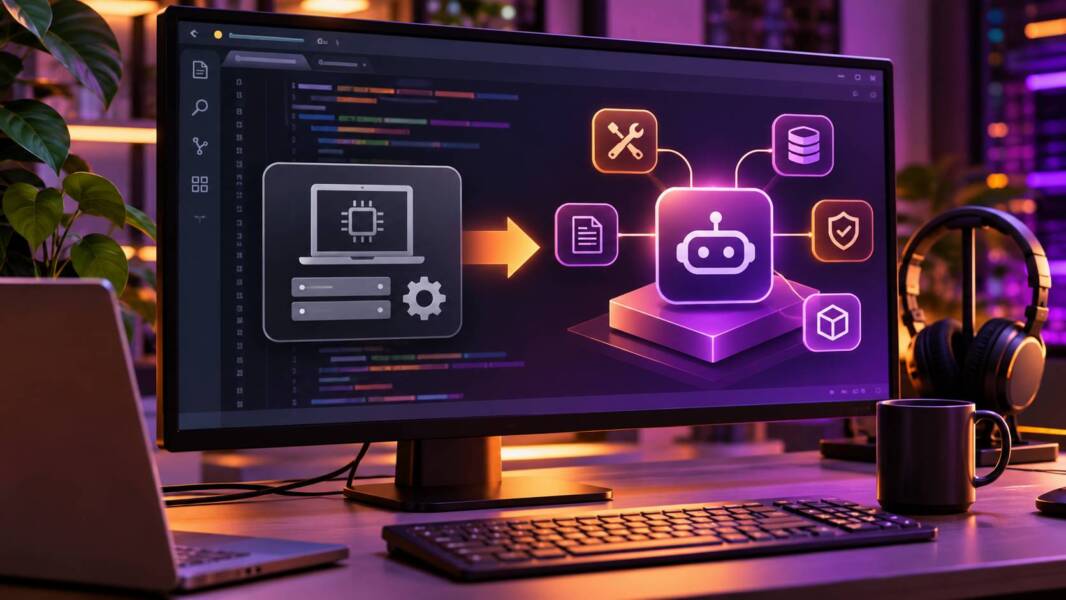
Visual Studio Code 1.146 deprecates the Local harness, which coordinates the AI model, context and tools used during GitHub Copilot agent sessions. Its replacement, the Microsoft Copilot harness, is already built into VS Code and has been the default for new sessions since version 1.143.
GitHub Changelog
The change is more significant than a user-interface adjustment. The harness determines how an AI coding agent receives context, invokes tools, handles permissions and maintains its working session.
Developers can continue running agent commands locally. Selecting the Copilot harness does not automatically move project files into the cloud.
However, existing customizations may require changes, and organizations need to verify their security policies before the legacy runtime disappears.
What Is Changing in the VS Code Copilot Harness Migration?
The November announcement establishes a transition from an editor-specific agent implementation to a shared runtime built on the Copilot SDK.
That shared runtime also powers GitHub Copilot CLI and the GitHub Copilot app.
Microsoft’s goal is to provide more consistent agent capabilities across supported development environments.
| Area | Local harness | Copilot harness |
|---|---|---|
| Status | Deprecated | Current default |
| Removal deadline | February 2027 | No announced retirement |
| Runtime | Legacy editor-specific | Shared Copilot SDK runtime |
| Agent session continuity | Legacy behavior | Shared session support across supported VS Code interfaces |
| Managed runtime restrictions | Cannot enforce newer controls | Supports managed permissions and sandbox restrictions |
| New feature development | Limited during transition | Primary focus |
| Customizations | Existing legacy configuration | Compatibility review required |
The change does not mean GitHub Copilot itself is being discontinued.
It changes the software coordinating agent execution.
Why an agent harness matters
An AI model generates responses and decisions, but the harness determines how those decisions interact with development tools.
For example, a coding agent may need to read source files, execute a test command, inspect terminal output and modify several files.
The harness manages the surrounding workflow: supplying context, exposing tools, requesting approvals and coordinating subsequent actions.
Two sessions using the same underlying AI model can behave differently when their harnesses provide different tools, context-management rules or permission systems.
This makes the harness part of the engineering environment, not merely a cosmetic preference.
When Will the VS Code Local Harness Be Removed?
Microsoft says the Local harness will be removed in February 2027.
The November 16 announcement does not specify an exact day within that month.
During the approximately three-month transition, developers can continue using the Local harness where organizational policies permit.
However, new features and improvements will concentrate on the Copilot harness.
Microsoft also warns that the temporary enterprise setting vscode.temporaryDefaultToLocalHarness will disappear with the legacy implementation.
Organizations should not rely on that exception as a permanent compatibility solution.
How to Switch From Local to Copilot Harness in VS Code
Microsoft’s documented migration process begins with selecting the new runtime for an agent session.
The basic procedure is:
-
Update Visual Studio Code to a supported release.
-
Open a new agent session.
-
Locate Session Target.
-
Select Copilot instead of Local.
-
Verify that the required tools and customizations work.
-
Confirm that permissions and sandbox policies behave as intended.
The official VS Code migration guide provides additional instructions for existing configurations.
Visual Studio Code
Why creating a new session matters
Switching harnesses changes the runtime responsible for coordinating the agent.
Developers should not assume that an existing Local session can be transferred with every detail of its context and configuration preserved.
For critical tasks, finish or document ongoing work before changing the execution environment.
Record the current branch, uncommitted changes and important task instructions so that work can be resumed safely.
Check custom instructions and tools
Microsoft explicitly warns that switching harnesses does not automatically convert every customization.
Teams should review custom agents, reusable instructions, skills, hooks and tool integrations.
An instruction file may remain readable while a particular tool integration behaves differently.
The correct test is therefore whether the complete workflow still functions, not merely whether the configuration file exists.
Why Microsoft Is Moving to a Shared Copilot Runtime
The Copilot harness is designed to share agent infrastructure across supported Copilot products.
That creates opportunities for more consistent model integration, context handling and tool execution.
It also allows improvements to the underlying runtime to benefit several development experiences.
Session continuity across development interfaces
Microsoft says developers can continue a session between the VS Code editor and the Agents window while the Agent Host process remains running.
This can make it easier to supervise multiple tasks without restarting every conversation.
However, editor-provided tools still require a connected editor.
Session continuity should not be confused with unlimited background execution or complete independence from the development environment.
Copilot Fusion integration
The new harness supports GitHub Copilot Fusion, which can select models and, on supported tiers, coordinate drafting and review.
TechnologyHQ previously examined GitHub Copilot Fusion’s model routing, pricing and local AI options.
That analysis explains why model routing introduces a different engineering decision from choosing a single fixed model.
The harness migration adds another dimension: how those models receive context and interact with development tools.
A team evaluating agent performance should therefore consider both model selection and harness configuration.
VS Code Copilot Harness Security: What Changes?
Security governance is one of the most important technical differences.
Microsoft says the Copilot harness supports managed runtime permissions and sandbox restrictions that the Local harness cannot enforce.
These controls can help organizations establish boundaries around filesystem access, network operations and tool execution.
However, selecting the Copilot harness does not automatically enable sandboxing.
Administrators must configure the relevant controls separately.
Why runtime enforcement matters
AI agents may encounter instructions in repository files, documentation or external tool responses.
Some of that content may be untrusted.
A malicious instruction could attempt to persuade an agent to access sensitive files, execute unauthorized commands or disclose credentials.
A policy enforced by the runtime can provide stronger boundaries than an instruction that merely tells the model not to perform an operation.
For example, a filesystem restriction can prevent access to a protected directory regardless of whether the model proposes reading it.
That does not make the entire system immune to security failures, but it creates an additional technical control.
Assisted permissions still require oversight
The Copilot harness also supports assisted permissions.
Microsoft says this capability can reduce interruptions for operations assessed as acceptable, while calls not approved by the risk assessment still require confirmation.
Organizations should verify how this interacts with their approval requirements.
A convenient permission workflow should not silently expand an agent’s authority over production systems, credentials or sensitive repositories.
Does the Copilot Harness Move Code to the Cloud?
No. Microsoft explicitly states that selecting the Copilot harness does not move project files to the cloud.
Developers can continue running agent commands on their own machines.
However, local execution and local AI inference are different concepts.
A locally running agent can still use cloud-hosted AI models or connected services.
Organizations with strict data-handling requirements should examine the configured model provider, context transmission and available tool integrations.
The harness choice alone does not establish that all processing remains on the developer’s computer.
What Happens to MCP Servers, Skills and Custom Agents?
The migration deserves particular attention for teams that have invested in customized AI-agent workflows.
Microsoft’s newer runtime supports integrations such as Copilot connectors, with some capabilities still in preview.
These connectors can provide context from team services without requiring developers to configure every MCP server manually.
However, that does not guarantee automatic compatibility with existing MCP configurations.
Review reusable agent instructions
Many engineering teams now maintain reusable skills, prompts and custom agent definitions.
These components influence how agents review code, generate tests or execute development procedures.
TechnologyHQ’s analysis of Dependabot support for AI agent packages explains how reusable agent instructions are increasingly managed as versioned dependencies.
The harness migration reinforces the need to test those dependencies.
A skill that behaves correctly under one runtime may depend on tools, context conventions or approval behavior that differ under another.
Avoid changing everything simultaneously
Teams should resist combining harness migration, model replacement and major agent-instruction updates into one uncontrolled change.
Doing so makes failures difficult to diagnose.
A better approach is to establish a working baseline, migrate the harness, verify behavior and then introduce other changes separately.
How to Test the New Copilot Harness
A useful migration test should cover realistic development work rather than a simple demonstration prompt.
Choose tasks that exercise the tools and permissions developers actually use.
For example, an engineering team might test a unit-test generation task, a multi-file refactoring exercise, a dependency update and a debugging workflow.
Evaluate the results against the same repository state and acceptance criteria.
| Evaluation area | What to check |
|---|---|
| Tool compatibility | Required commands and integrations remain available |
| Context handling | Agent can locate and use relevant project information |
| Code correctness | Generated changes pass appropriate tests |
| Permission enforcement | Restricted operations are blocked or require approval |
| Sandboxing | Filesystem and network boundaries work as configured |
| Session continuity | Supported session transitions preserve useful work |
| Customizations | Skills, hooks and agent instructions behave as expected |
Test security boundaries deliberately
A migration should include negative tests: operations that the agent is not supposed to perform.
For example, administrators can use harmless test resources to verify that the agent cannot access a restricted directory or perform an unauthorized network operation.
Such tests should run in a controlled environment without production credentials.
The goal is to confirm that security policy is enforced by the runtime rather than merely described in instructions.
What Enterprise Administrators Should Do Before February 2027
Administrators should identify developers and managed installations still using the Local harness.
The next step is to review any use of vscode.temporaryDefaultToLocalHarness.
Because that setting is temporary, organizations need a migration plan rather than an indefinite exception.
They should also verify the required model policies, managed permissions and sandbox configuration.
A practical enterprise rollout plan
Begin with a small group of developers representing different workflows and repositories.
Document their existing customizations and establish acceptance criteria.
Next, migrate the pilot group to the Copilot harness and test normal development operations alongside restricted security operations.
Resolve compatibility problems before expanding deployment.
Finally, communicate the February 2027 deadline and remove reliance on legacy-only behavior.
Microsoft recommends reporting blocking issues through the VS Code issue tracker.
What the Announcement Does Not Guarantee
The November 16 release confirms the retirement timeline, shared runtime architecture and availability of several new capabilities.
It does not establish that every Local harness customization is automatically compatible.
It does not guarantee identical behavior between the two runtimes.
It also does not mean that every Copilot harness feature is available on every subscription tier.
Some capabilities, including connectors and canvases, remain in preview.
Organizations should distinguish between supported runtime functionality, experimental features and their own deployment requirements.
Frequently Asked Questions
When will VS Code remove the Local harness?
Microsoft says the Local harness will be removed in February 2027. An exact removal day was not specified in the November 16 announcement.
What replaces the Local harness?
The Microsoft Copilot harness, built on the shared Copilot SDK runtime.
Is the Copilot harness already the default?
Yes. Microsoft says it has been the default for new sessions since VS Code 1.143.
Will switching harnesses move my code to the cloud?
No. Selecting the Copilot harness does not automatically move files to cloud infrastructure.
Will existing custom agents and instructions continue working?
Some may work without changes, but Microsoft warns that customizations are not automatically converted. Compatibility testing is necessary.
Does the Copilot harness automatically enable sandboxing?
No. Administrators must configure sandbox restrictions separately.
Can developers continue using Copilot Free?
Microsoft says existing GitHub Copilot plans, including Copilot Free, remain usable. Individual features and model tiers depend on plan and policy.
The Bottom Line
The VS Code Copilot harness migration is an infrastructure change affecting how AI coding agents coordinate models, context, tools and permissions.
Microsoft is replacing a legacy editor-specific runtime with a shared platform designed to support newer agent capabilities and stronger enterprise controls.
The February 2027 deadline gives developers time to prepare, but the transition should not be treated as a simple settings change.
Teams should validate customizations, test their development workflows and configure security controls explicitly.
The most successful migrations will preserve the reliability of existing engineering processes while taking advantage of the newer runtime’s capabilities.

Ingrid Maldine is a business writer, editor and management consultant with extensive experience writing and consulting for both start-ups and long established companies. She has ten years management and leadership experience gained at BSkyB in London and Viva Travel Guides in Quito, Ecuador, giving her a depth of insight into innovation in international business. With an MBA from the University of Hull and many years of experience running her own business consultancy, Ingrid’s background allows her to connect with a diverse range of clients, including cutting edge technology and web-based start-ups but also multinationals in need of assistance. Ingrid has played a defining role in shaping organizational strategy for a wide range of different organizations, including for-profit, NGOs and charities. Ingrid has also served on the Board of Directors for the South American Explorers Club in Quito, Ecuador.